


Collectr - TCG Collector App
4.81.98K Reviews
App Specs
- Version
- 2.5.6
- Updated On
- License
- Free
- Downloads
- 1,000,000+
- Developer
- Collectr Inc
- Categories
- Tools
- Platform
- Android
Screenshots
 Analysis by AppCompare
I often think the hardest part of collecting cards isn’t finding another one to chase; it’s remembering what I already own and making sense of a collection that keeps changing. A phone-based catalog can help, but only if I can move through it comfortably and trust what I’m seeing. Collectr - TCG Collector App is a tools app from Collectr Inc built around tracking trading card collections and their value. I’d consider it most useful when I want a portable overview, rather than a replacement for carefully checking a card in person.
How the layout works for a growing collection
On first use, the appeal is how quickly the app gives a collector somewhere to begin. The screens feel approachable, and I didn’t need to understand a complicated cataloging system before adding cards. That low barrier matters if I’m setting up a collection in short sessions, perhaps while sorting a few cards at a time instead of entering everything in one long sitting.
Collectr has a 4.8 average from around 29,000 ratings, and it has passed over a million installs. Those figures suggest that the app has found an audience, but they don’t tell me whether it suits every collecting style. My own test is more practical: can I identify a card, put it in the right place, and return later without having to reconstruct my decisions? The collection and wishlist tools give that process a useful structure.
Readability and navigation in everyday use
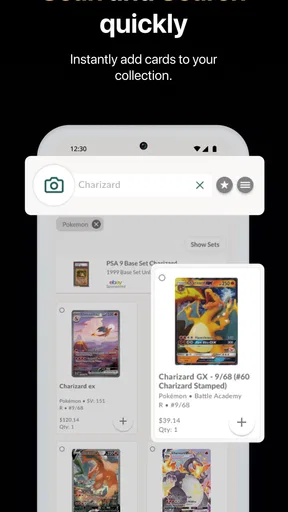
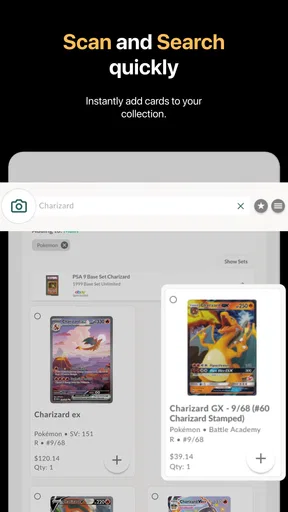
The first screens are visually clear enough that I could find my way around without feeling lost. For a collector who is less confident with phone apps, that makes a difference: an inventory tool should help with the cards, not create a second organizational project. I like that adding cards can be approached through scanning or manual entry, so there is a fallback when camera recognition needs correction.
That flexibility also points to a sensible workflow. I’d use scanning to get a first pass through a small batch, then review the entries before relying on them. For a valuable card, a quick check of the name and details is worth the extra moment. If a scan looks uncertain, manual editing is better than letting a mistaken entry quietly distort the record or collection value.
Useful for more than one kind of collector
The app supports separate collections, which helps when I want to keep different games or collecting goals distinct rather than mixing everything into one long inventory. A casual player might track cards they actually use; a set-focused collector can keep an eye on gaps; and someone who trades can use the collection view as a reference before starting a conversation. That is more practical than a single note on a phone, especially once the list becomes difficult to remember.
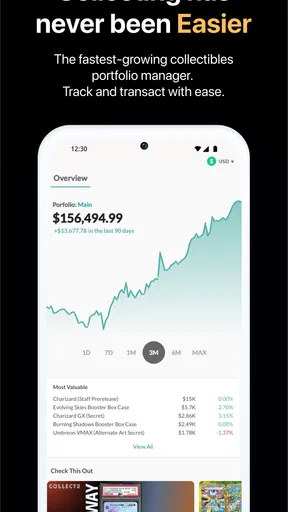
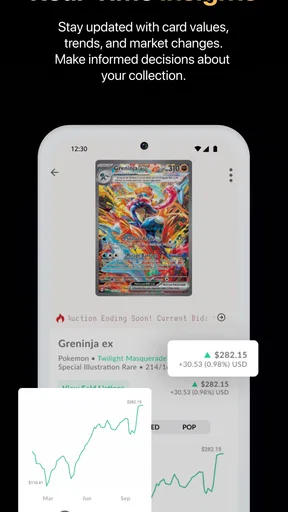
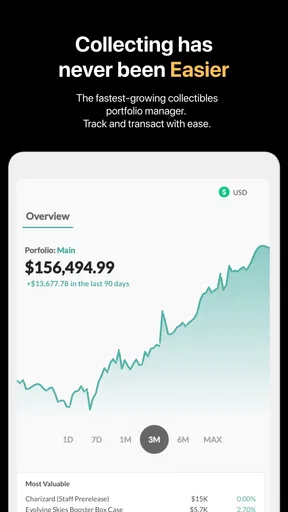
Value tracking can be helpful, but I treat it as a guide rather than a promise of what a card will sell for. Condition, edition, language, and the terms of a particular deal can all affect what another collector is willing to pay. I’d check details before making a purchase or trade, and I wouldn’t use an app estimate alone to decide that a card is worth selling. The main benefit is having a quick overview that can prompt a closer look.
Worth Reading Before You Choose

EA SPORTS FC Mobile 26 Is a Bigger Football Game, but It Takes Time

Flipboard Shows What News Apps Must Do Beyond the Feed

Switching to Android Auto Means Rethinking Your Driving Routine

Google Calendar Makes a Crowded Week Easier to Manage

Ludo King Makes the Most of the Minutes Between Plans

Baby Panda World Brings Quick Play to Modern Phones, but Its Game Library Feels Busy
Motor and sensory considerations
Camera-based entry can save typing, but it isn’t automatically the easiest option for everyone. Holding a card steady, framing it, and checking a result may take more effort for someone with limited dexterity or hand tremors. In that situation, adding cards manually in smaller batches may be less frustrating, even if it takes longer. I’d also choose a well-lit, calm moment for scanning rather than trying to catalog cards while moving around or juggling several things.
For anyone sensitive to busy screens or who prefers a more deliberate pace, the best approach is to focus on one task at a time: add a card, check its entry, then continue. The app’s organization can make a large collection easier to approach, but it does not remove the need to inspect the information. I wouldn’t rush through a high-value inventory just to finish quickly.
Where the convenience has limits
Collection catalogs are only as useful as their entries. If a card’s details are incomplete or inaccurate, I need to correct them rather than assume the app has identified every variation perfectly. This matters most when similar printings look alike or when a small detail changes how I distinguish one card from another. Keeping notes on cards that need a closer check can prevent a quick scan from becoming a false sense of certainty.
I also wouldn’t choose a phone catalog as my only record if I needed a formal insurance inventory or a carefully documented sales ledger. Those situations call for checking the exact card, its condition, and any documentation requirements directly. Collectr is more convenient as a day-to-day collection companion: it helps me see what I have and what I’m looking for, while leaving final decisions to my own inspection.
Getting Started with Collectr
First things first, let's talk about setting up the app. The download and installation were a breeze—no hiccups there. Once you open the app, you're greeted with a clean and intuitive interface that’s easy on the eyes. It didn’t take long for me to find my way around, which is a huge plus if you’re not a tech wizard.
Adding your cards is as simple as pie. You can either scan your cards using your phone’s camera or manually input the details. I tried both methods and found the scanning feature to be surprisingly accurate, though I did have to tweak a few entries manually. But hey, nothing’s perfect, right?
The Features You’ll Love
Now, let’s dive into what makes this app stand out. One of my favorite features is the ability to create and manage multiple collections. Whether you’re into Pokémon, Magic: The Gathering, or Yu-Gi-Oh!, Collectr has got you covered. You can easily switch between collections and customize them as you see fit.
The app also offers a sleek way to track your collection’s value. As someone who occasionally trades cards, having a real-time update on the market value is super handy. Plus, it’s a great way to brag about your most valuable cards to your friends!
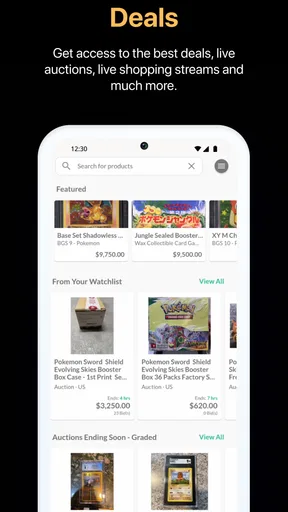
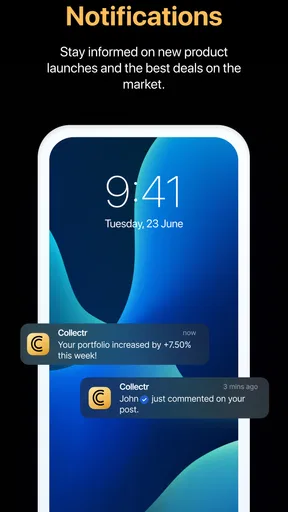
Another cool feature is the wishlist function. Ever find yourself dreaming about that elusive card missing from your set? You can add it to your wishlist and receive notifications if it becomes available on the market. Talk about a lifesaver!
Socializing and Trading
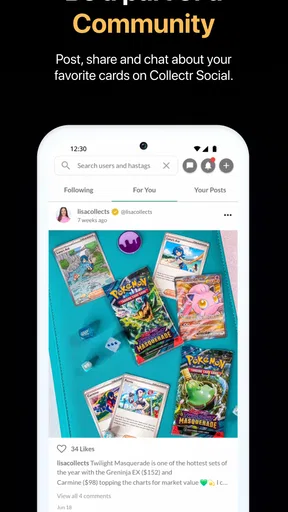
Collectr isn’t just about organizing your cards; it’s also a social hub. You can connect with other collectors, check out their collections, and even engage in trades. I found this feature to be a fun way to meet fellow enthusiasts and expand my network.
The trading feature is straightforward. You can propose trades and negotiate terms directly within the app. It’s like having a virtual card shop in your pocket. I managed to snag a card I’d been eyeing for months through a trade, which made my day!
Customization and Personalization
If you love personalizing your space, you’ll appreciate the customization options in Collectr. You can adjust the layout of your collections, set custom backgrounds, and even add notes to individual cards. It’s these little touches that make the app feel like it’s truly yours.
Moreover, the app offers various themes that you can switch between to match your mood or the current season. I’m all about those autumn vibes right now, so the fall theme was a perfect fit for me.
Room for Improvement
While Collectr is a fantastic tool, it's not without its quirks. Occasionally, the app can run a bit slow, especially when scanning large batches of cards. It’s not a deal-breaker, but something to keep in mind if you’re planning a big inventory update.
I also noticed that some of the card details were missing or incorrect, which required a little manual tweaking. It’s nothing major, just a gentle reminder to double-check your entries.
Choosing it over a spreadsheet or paper list
A spreadsheet gives me more control over columns and can be shaped into a detailed record, but it asks me to build and maintain that system myself. A paper list is quick for a small collection, though it becomes awkward to update and consult when I’m away from home. Collectr sits between those options: it gives a card-focused place to organize entries, track value, and keep a wishlist without making me design a spreadsheet from scratch.
That convenience has a trade-off. If I care about unusual details, such as where I stored a card or why I’m keeping a particular copy, I should use the available notes and keep the record consistent. I’d avoid creating a different naming habit for each set; a repeatable method makes later searches more dependable. For a large collection, I’d start with the cards I trade or look up most often, then add the rest gradually rather than turning setup into a weekend-long chore.
A realistic routine for checking cards and making plans
Imagine I’m heading to a local trading meet and want to know whether I already own a card someone has offered. I can check the collection on my phone, compare the entry, and use the value overview as a starting point for discussion. I’d still inspect the physical card and agree on condition and terms face to face. That division of labor is where the app makes sense: it helps me prepare, but it shouldn’t settle a negotiation by itself.
The wishlist is useful in a different way. Instead of relying on memory while browsing, I can keep desired cards together and revisit that list when I’m deciding what to pursue. I’d treat an availability notification as a reason to look, not an instruction to buy; it doesn’t remove the need to check the exact version and whether the asking terms suit me. This small pause helps keep collecting intentional rather than turning every alert into a purchase decision.
Who will benefit, and who may prefer another method
I’d recommend trying Collectr if cards from several games are becoming hard to track, if I trade often enough to want a portable reference, or if a wishlist would help me avoid buying duplicates. It also makes sense for someone who enjoys seeing a collection take shape over time. The free app is rated for Everyone, with in-app purchases ranging from $7.99 to $59.99 per item, so I’d look at the available options in the app and decide whether its extra value is worth paying for rather than assuming I need them.
On the other hand, a person with only a small handful of cards may find a simple note or spreadsheet faster. Someone who needs highly customized inventory fields, strict audit trails, or a formal valuation process may also prefer a purpose-built record system and a separate appraisal approach. Collectr’s strength is the accessible, card-oriented overview; it is not a substitute for careful authentication, grading, or a documented sale record.
Access across different situations
Because it is a phone app, I can consult a collection away from the desk, which is handy when sorting cards with a friend or checking a possible trade. A larger review session is better done somewhere stable, with enough light to scan and enough time to correct entries. For someone who finds prolonged screen use tiring, breaking the work into short sessions is more realistic than trying to catalog an entire binder at once.
The app is currently at version 2.4.4 and supports devices running version 7.0 or later. Collectr was released on January 30, 2022, and its focused purpose is clear: it is a tool for keeping tabs on trading-card collections, rather than a general-purpose inventory manager. I find that focus useful, provided I keep a separate backup of information that matters to me and verify important card details before acting on them.
Final Thoughts
All in all, the Collectr - TCG Collector App is a solid choice for anyone looking to organize and enhance their trading card experience. It’s packed with features that cater to both casual collectors and serious enthusiasts. Despite a few minor hiccups, it’s a highly functional app that could save you a ton of hassle in managing your collections.
If you’re ready to take your card collecting to the next level, I highly recommend giving Collectr a try. Who knows? It might just become your new favorite app. Happy collecting!
Pros
- Intuitive interface for easy navigation.
- Comprehensive database of TCG cards.
- Customizable collections and wishlists.
- Regular updates with new card sets.
- Supports multiple TCGs for diverse needs.
Cons
- Limited offline functionality.
- Occasional sync issues with server.
- Ads can be intrusive for free users.
- Some features locked behind paywall.
- Lacks social features for community interaction.
FAQs for Collectr - TCG Collector App
What platforms is Collectr - TCG Collector App available on?
Collectr - TCG Collector App is available for both Android and iOS devices. Users can easily download it from the Google Play Store or the Apple App Store. The app is optimized for smartphones and offers a seamless experience across different devices, ensuring that collectors can manage their collections on the go.
Does Collectr - TCG Collector App support all trading card games?
Collectr - TCG Collector App supports a wide range of popular trading card games, including Magic: The Gathering, Pokémon, and Yu-Gi-Oh! However, the app is continuously updated to include more games based on user feedback. If your favorite game isn’t supported yet, it might be in future updates.
Is there a cost associated with using Collectr - TCG Collector App?
Collectr - TCG Collector App offers a free version with basic features, allowing users to manage their collections and access essential functionalities. For advanced features, such as detailed analytics and premium tools, users may opt for a subscription model or in-app purchases to enhance their experience.
How does Collectr - TCG Collector App help organize my card collection?
The app provides a comprehensive and user-friendly interface for cataloging and managing your trading card collection. You can easily scan cards using your phone’s camera, add them to your digital collection, track card values, and create custom lists. The app also allows for easy searching and sorting to quickly find specific cards.
Can I share my collection with others using Collectr - TCG Collector App?
Yes, Collectr - TCG Collector App enables users to share their collections with friends or fellow collectors. You can export your collection details or share directly through the app. This feature is particularly useful for trading and showcasing your collection, enhancing the social aspect of collecting.


